| Recovering Windows Account Password | ||||||||
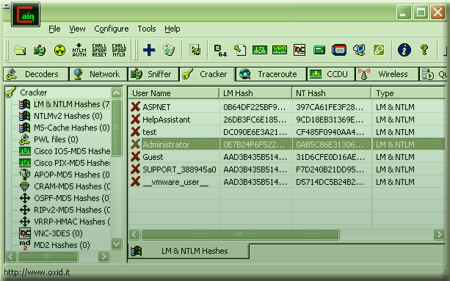
In order to recover your Windows user password, first you have to get the LM hash for the target user account. This can be done in many ways. You can use any of the tools such as pwdump, cain&abel or LC5. You need to have administrator privileges to dump the hashes using these tools. If you have lost administrator password itself, then you can boot the system using BackTrack live cd or Windows restore CD and then copy the SAM & SYSTEM hive files (which is located in c:\windows\system32\config folder. Note that your system drive may be different). Next feed these files to Cain & Abel tool to get the LM hashes for the target account. | ||||||||
| Here is the screenshot of retrieving LM hash for users using the Cain&Abel tool | ||||||||
 | ||||||||
Once you have collected the LM password hash, you can start the password cracking operation using the rcrack tool (part of the RainbowCrack Project) with the rainbow tables that you have already created for certain character sets. | ||||||||
| Note that with Vista onwards Windows no longer stores LM hashes (unless under certain configurations) as it was susceptible to easy brute force cracking. In such cases, you can as well use the NTLM hash to recover password with RainbowCrack. | ||||||||
| Ideally setting up the rainbow tables takes huge amount of disk space and lot of computing time to generate the tables. Hence its not practical for anyone to create such an setup on the home system. | ||||||||
| Download:http://adf.ly/4wKwP |
Saturday, January 21, 2012
Recover Windows Passwords Using Rainbow Crack

Subscribe to:
Post Comments (Atom)
No comments:
Post a Comment